AI virtual receptionist
Every call answered. Day and night.
Your AI receptionist picks up in your business's name, answers from your own hours, services and prices, and books the visit into your calendar. Every call lands in your CRM with a summary, so nothing sits in a voicemail box.
- Included in every plan
- 500 minutes a month to start
- Live in about 2 weeks
Hear it answer as your business
Got a preview website from us? Enter the Website ID from your email and call your receptionist right here in your browser. It picks up in your business's name and answers questions from your preview website.
Things to try
- What do you charge for a typical job?
- Can someone come out this week?
- Do you work in my area?
- What are your hours?
Your browser will ask to use your microphone.
Demo calls end after 3 minutes.
- 1Enter the Website ID from your email.
- 2Press Call and allow your microphone.
- 3Ask it what your customers ask you: prices, timing, your area, your hours.
The demo answers from your preview website and takes a message. Your real receptionist answers from the information you give it and can book the visit into your calendar, as shown below.
No Website ID yet? Call (888) 533-5784 to hear ours, answering for BrickByClick.
What happens when someone calls
The same five things, on every call, at any hour.
-
It answers in your business's name.
No voicemail, no press-1 menu. A natural-sounding AI voice picks up as your business, day or night. Returning customers are greeted by their first name: it knows them by the number they call from.
AIReturning caller“Hey Gina, thanks for calling Ace Plumbing back! Just so you know, calls are recorded for quality. How can I help you today?”
-
It answers questions from your information.
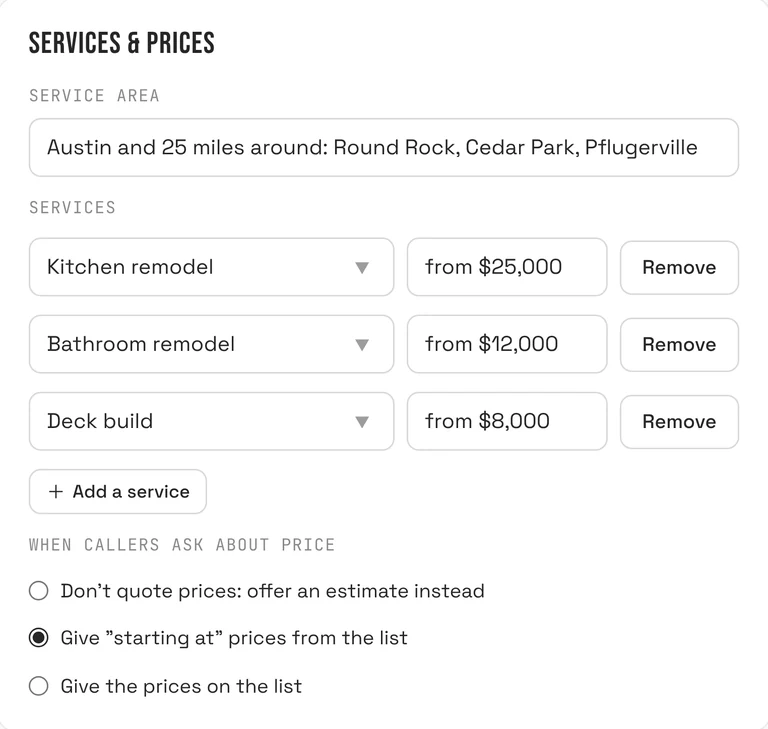
Your hours, service area, services and prices, closures, emergencies and common questions, straight from the Receptionist page in your CRM. You choose how it handles price questions: offer an estimate instead, give “starting at” prices, or give the prices on your list.
-
It books, moves or cancels, within your rules.
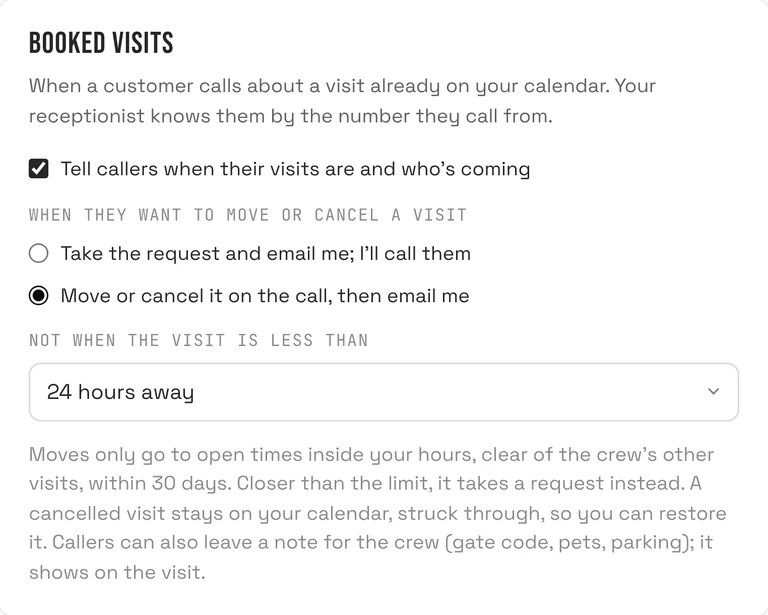
Turn on live booking and it offers real open times inside your hours and around what's already on your calendar, then books the one the caller picks. For visits already on the calendar, it can tell callers when you're coming and who's coming, move or cancel inside your notice limit, or take the request and email you. Callers can also leave a note for the crew, like a gate code.
-
It asks how they heard about you.
New callers are asked where they found you, and who sent them if it was a referral. The answer is saved on the contact, so your reports show where your work comes from.
Heard about you- Referral
- Facebook / Instagram
- Yelp
- Nextdoor
- Angi / HomeAdvisor
- Thumbtack
- Truck / yard sign
- Repeat customer
-
You get the summary.
The call lands in your Inbox with a summary, the recording and the transcript. A new caller becomes a contact in your pipeline. And you get an email right away with who called and what they need.
BrickByClick · 7:04 AMNew lead from a call: Marcus Reed · Drain cleaningYour AI receptionist just finished a call with a new caller.- Name
- Marcus Reed
- Phone
- (512) 555-0148
- Needs
- Drain cleaning
Kitchen sink backing up since last night. Wants someone this week. Found you on Google.
You decide what it knows
Everything it says about your business comes from one page in your CRM. Change it, save, and the next call uses it.
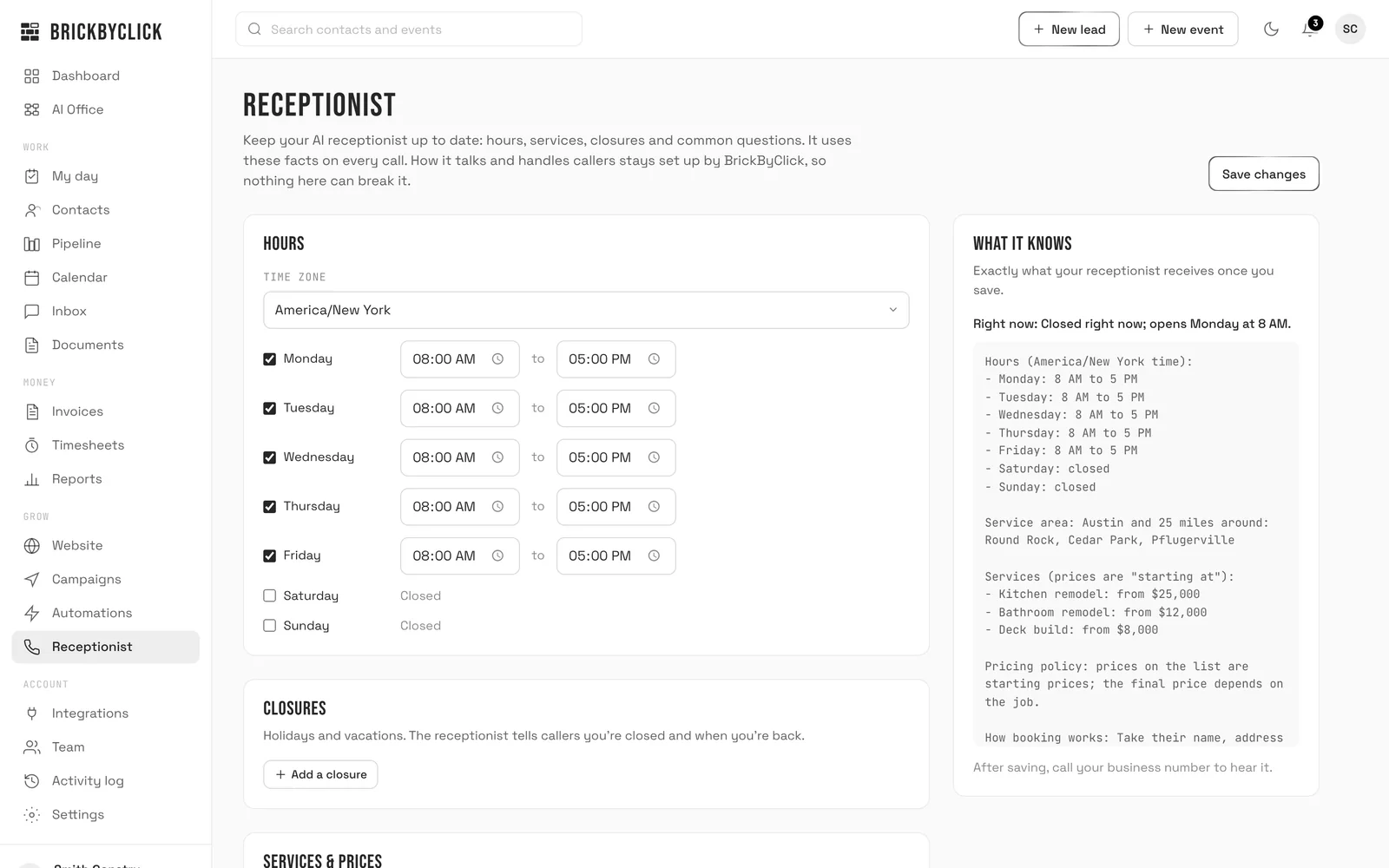
Hours and closures
Your hours and time zone, plus holidays and vacations. It tells callers you're closed and when you're back.
Services and prices
What you do, where you go, and whether it quotes prices, “starting at” prices or offers an estimate.
Booking rules
What it books, how long it takes, travel time between visits, how soon and how far ahead, and the most per day.
Booked visits
Whether it tells callers their visit times, and whether it moves or cancels them on the call or takes a request for you.
Emergencies
Whether you take emergency calls, what counts as one for you, and your emergency number.
Common questions
Up to 15 questions with your answers, plus anything else it should know, like “we don't do commercial work.”
A preview shows exactly what it knows, and every save is kept, so you can put an earlier version back. How it talks and handles callers stays set up by us, so nothing you type can break it.
The details that matter
Returning callers
Recognized by the number they call from, greeted by name, and told about their upcoming visits if you allow it.
After hours
It knows whether you're open right now. When you're closed it still answers, tells callers when you open, and books your next open times if live booking is on.
Spam filter
Robocalls and sales pitches from unknown numbers don't become contacts, don't send you alerts and don't count in your reports. A customer you already have is never filtered.
Keep your number
Forward your business line to it: every call, or only the ones you don't pick up.
Every call on record
Summary, recording and transcript in your Inbox, and the summary saved as a note on the contact.
Nothing changes quietly
Every visit it books, moves or cancels is noted on the contact and emailed to you. Moves and cancellations also show in your activity log.
Minutes by plan
The receptionist is in every plan, with the CRM, the crew app, online payments and your website. Month to month, no setup fees.
Minutes are the time your receptionist spends on calls. Extra minutes are $0.10 each.
- Front Office$399 / month500minutes a month
- Growth$599 / month500minutes a month
- Total Growth$999 / month1,000minutes a month
Text messaging, waiting on carrier approval. Until then, your receptionist handles calls and your follow-ups go out by email.
Questions
Does it sound robotic?
What can't it do?
What if a caller asks something it doesn't know?
Can I keep my phone number?
What if I use more than my minutes?
Can it text my customers?
Is it for my kind of business?
Hear it before you decide
Call (888) 533-5784 and talk to ours. Then take fifteen minutes with us and we'll show you how it would answer for your business.